Save time. Avoid confusion. Keep everyone informed.
BUILT FOR CONGREGATIONS
One congregation. Connected across devices.
01 Save time02 Go paperless03 Coordinate better04 Stay connected
A LOOK INSIDE THEOHUB
Familiar screens. A clearer day.
From the congregation overview to a publisher's next assignment, explore how TheoHub fits into the week.
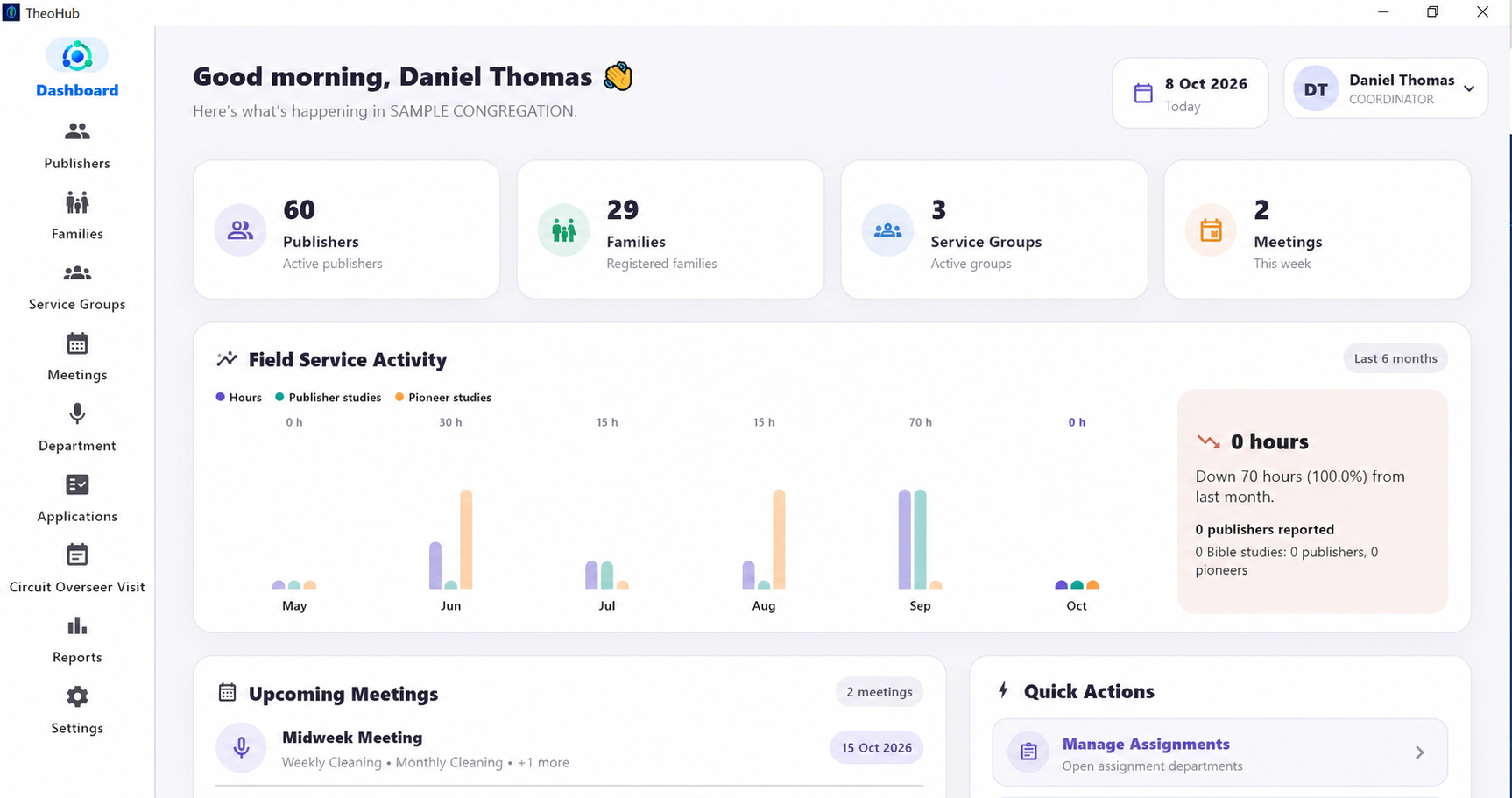
DESKTOP / CONGREGATION OVERVIEW
01 / THE BIG PICTURE
Your congregation, at a glance.
Start with the information you need: publisher and family totals, service groups, upcoming meetings and field service activity.
See key congregation figures together
Find upcoming meetings quickly
Open frequently used tasks from quick actions
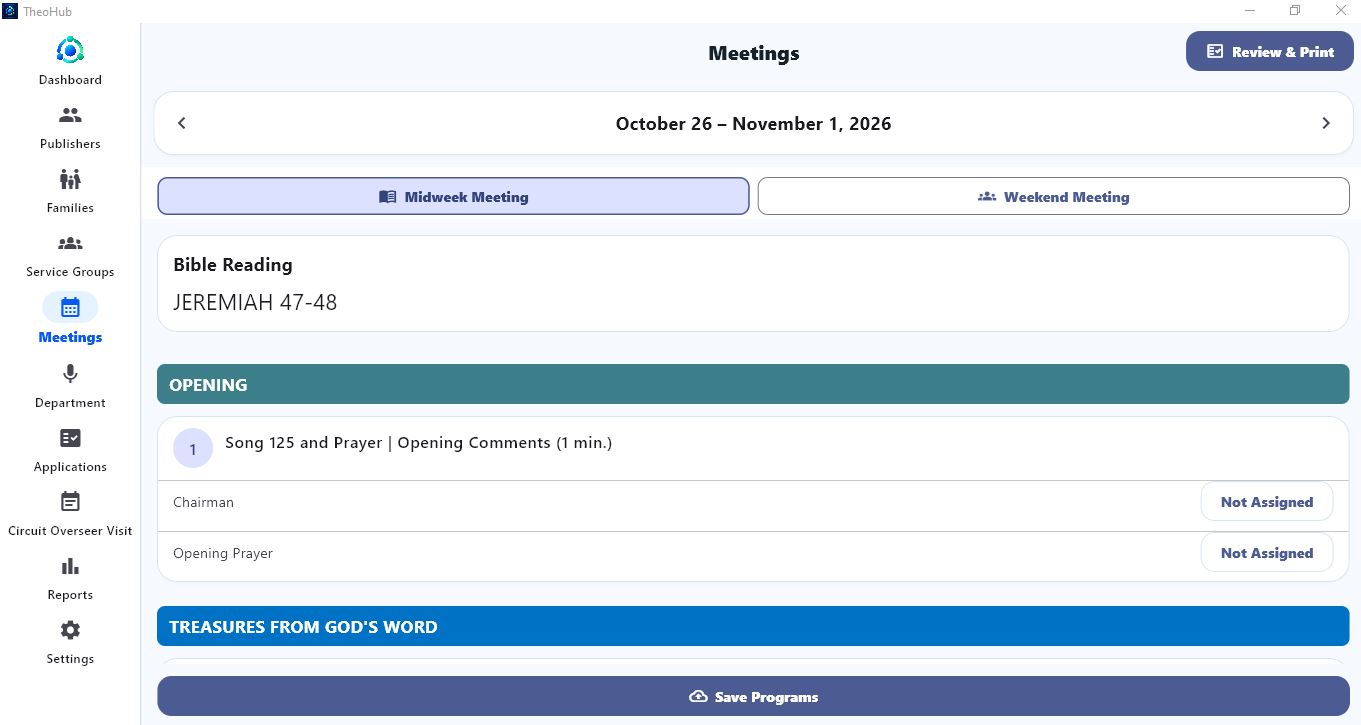
DESKTOP / MEETING PROGRAMME
02 / PLAN THE WEEK
Give every part a clear place.
Move between meeting weeks, review programme content and select publishers for each responsibility. Review the finished programme before printing.
Midweek and weekend meeting views
Assignee controls beside each programme part
A shared programme to review and print
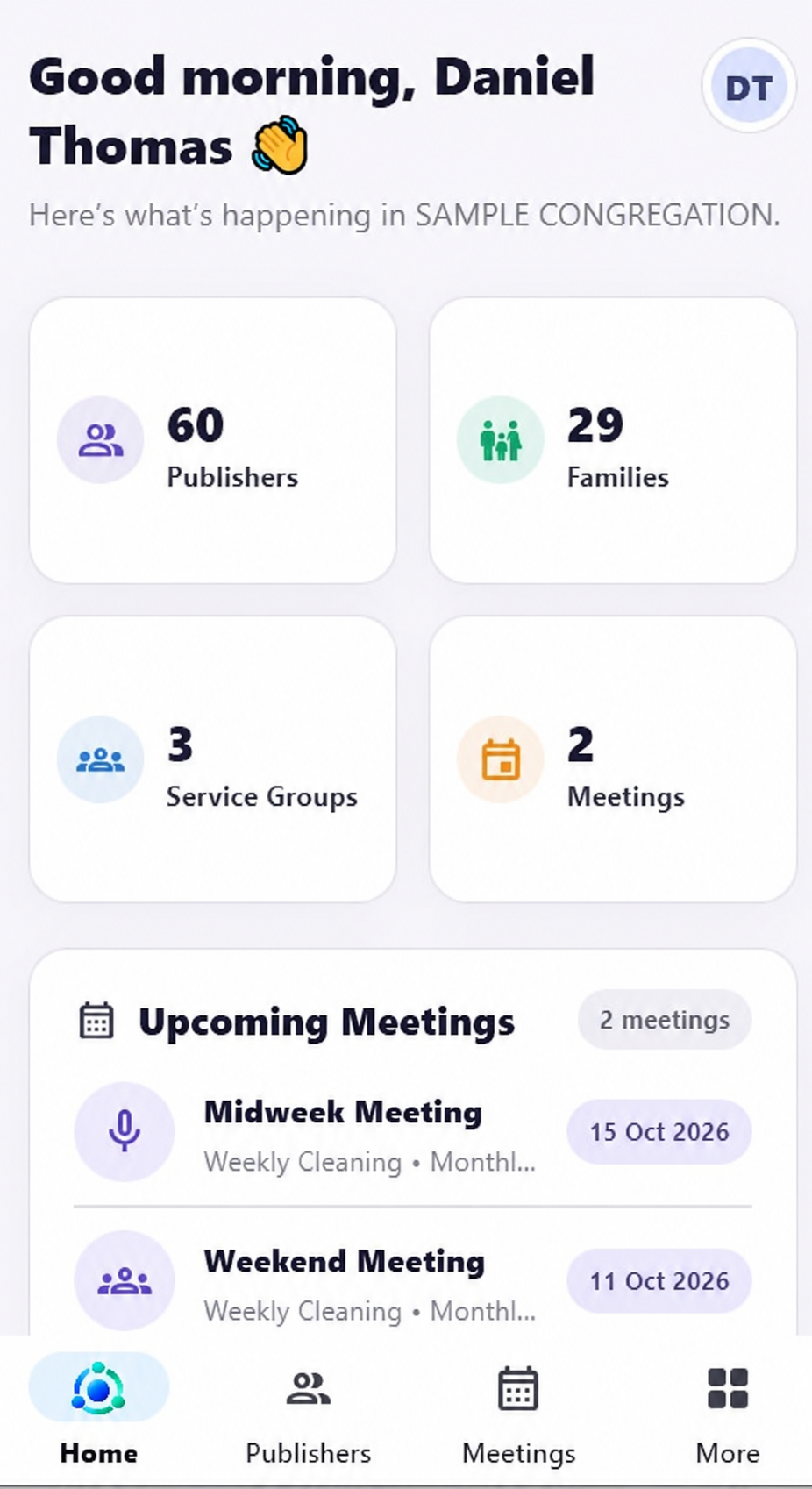
MOBILE / CONGREGATION OVERVIEW
03 / ON A SMALLER SCREEN
The essentials, within reach.
The congregation overview adapts to a phone, with clear tiles and simple navigation. Check what's coming up without opening a desktop.
Readable publisher and family totals
Upcoming meeting cards
Quick access through the bottom menu
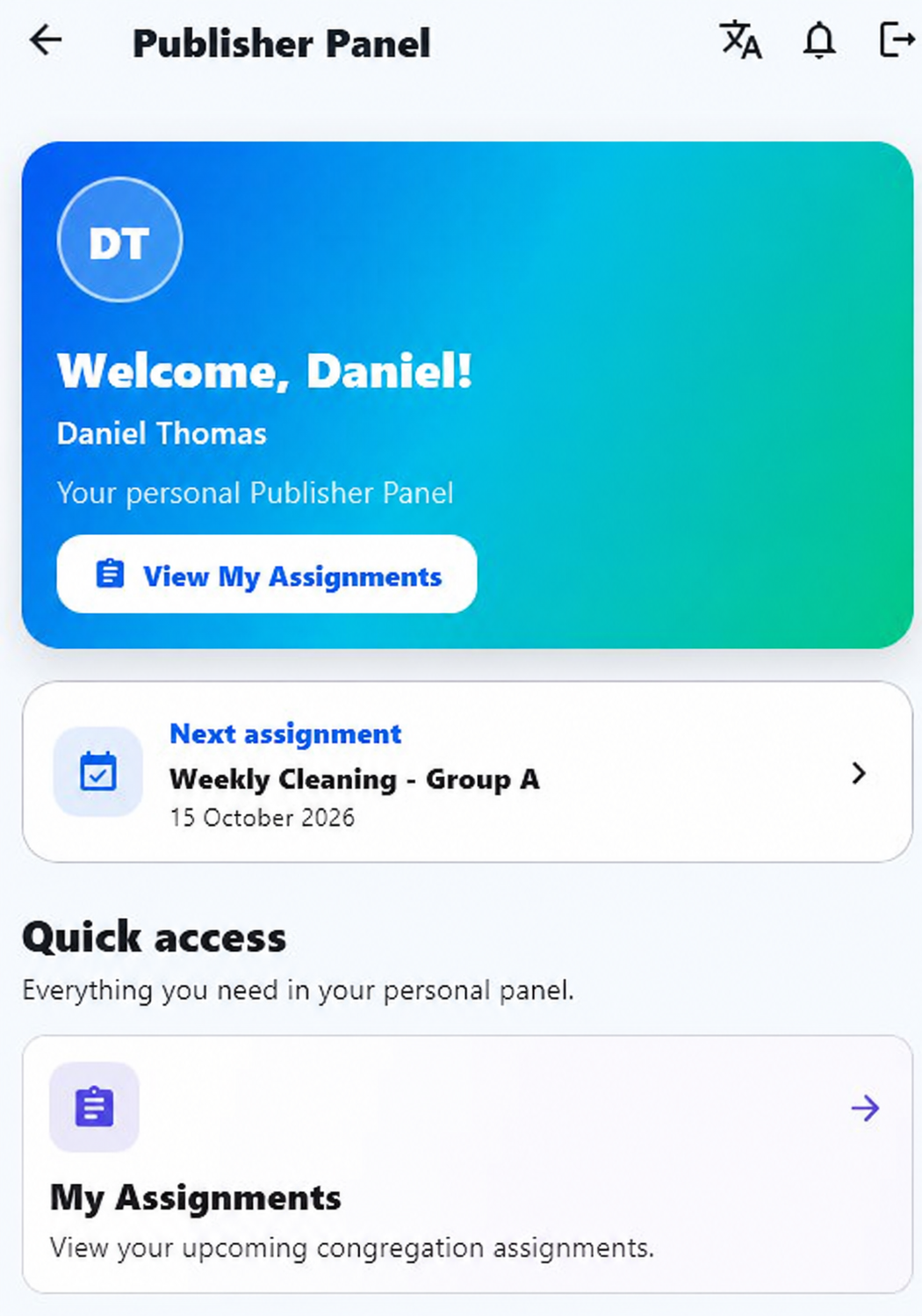
MOBILE / PERSONAL PUBLISHER PANEL
04 / A PERSONAL VIEW
Know your next responsibility.
A welcoming personal panel puts the next assignment up front. Publishers can also reach their reports, applications and notifications from their own account.
Next assignment and date in one card
A dedicated My Assignments view
Personal access to reports and applications
PRACTICAL SOLUTIONS, EVERY DAY
Less follow-up. Better coordination.
The tools behind a well-organized week, inspired by the everyday needs of elders, publishers and families.
01
Avoid assignment overlaps
Eligibility, availability and same-day conflict checks help avoid giving one publisher multiple responsibilities when other eligible publishers are available.
Clearer responsibilities02
Spend less time scheduling
Select a department and date range, generate a duty schedule, then review it. Audio/video, microphones, attendants and cleaning each have their own workspace.
Generate, review, confirm03
Keep publishers informed
Assignment notifications and personal updates help publishers see what is coming up. Shared elder reminders keep congregation tasks in view.
Fewer last-minute follow-ups04
Make reporting paperless
Publishers submit field service reports and auxiliary pioneer applications in the app. Elders can review monthly information and prepare useful reports and printouts.
Submit and review in one place05
Organize territory work
Keep territory records, assignments, returns and coverage history together in the Premium territory workspace.
Track congregation arrangements06
Use a familiar language
English, Malayalam, Hindi and Tamil interface support helps your congregation work in a familiar language.
Englishമലയാളംहिन्दीதமிழ்
07
One login for the family
Premium family access lets you select a linked member and view their assignments, submit their field service report or complete their auxiliary pioneer application.
Connected family access08
Prepare meeting programmes
Bring workbook content and programme assignments together. Select eligible publishers, review the weekly programme and prepare a clear printout.
A programme everyone can follow
PREMIUM / CIRCUIT OVERSEER VISITS
A visit programme everyone can follow.
Build the schedule day by day, add times and sub-programmes, and share the finished programme with publishers or print it for the visit.
Plan each daySelect dates and times within the visit period.
02
Add the programmeInclude the main programme and its contents.
03
Print or publishGive publishers one programme to refer to.
ONE CONGREGATION. ONE SUBSCRIPTION.
Choose your congregation's plan.
Registered members share their congregation's subscription. Current prices, monthly or annual options, and available trial offers are shown in the app.
STANDARD
The everyday essentials.
Tools for meetings, assignments and congregation reporting.
Plan selection and renewals are managed by authorised congregation elders.
THEOHUB ON YOUR DEVICE
Your congregation. Wherever you need it.
Choose the device that fits your routine. Verified release links will appear below when available.
APreparing release
Android
Keep assignments, reports and congregation updates close at hand.
APK download coming soon
Android coming soon
WPreparing release
Windows
A comfortable workspace for congregation planning, reporting and printing. Open the downloaded EXE and choose where to extract TheoHub.
Desktop download coming soon
Windows coming soonWindows may show an Unknown publisher confirmation because this release is not yet code-signed.
iIn preparation
iPhone & iPad
An Apple-supported release is planned. Availability will be announced here.
App Store or TestFlight link to follow
iOS coming soon
Your congregation provides the account details and congregation code needed to sign in.
A FEW HELPFUL ANSWERS
Before you begin.
Simple setup starts with your congregation.
Does every publisher need a subscription?
No. One congregation subscription covers its registered members. Each member uses the access provided for their account.
How do I get a publisher or family login?
Your congregation provides the login details, activation key and congregation code. Premium family accounts are linked to the members of that family.
Where can I see prices and trial offers?
Current Standard and Premium prices, billing periods and any available trial are shown in TheoHub's Subscription & Pricing screen. Your authorised congregation elder can review those options.
Can we print schedules and reports?
Yes. TheoHub includes print options for meeting programmes, department assignments, attendance and other congregation reports. Premium visit programmes can also be printed or published to publishers.
When can I download the app?
Android and Windows links will appear after the new service and release packages are ready. iPhone and iPad availability will be announced separately.